← All work

Making a design team AI-native

When leadership told every team to become AI-native, most stalled. I built the operating model that got mine there: the right AI at each point of the design cycle, taught across the discipline and made to stick. My team reached AI-native fluency a month before the deadline, and the model spread beyond our org.

RoleAI Lead, Facebook Design Org
Scope20+ designers, then Facebook-wide managers
OutcomeMy team to AI-native fluency a month before deadline, and the model spread beyond Profile
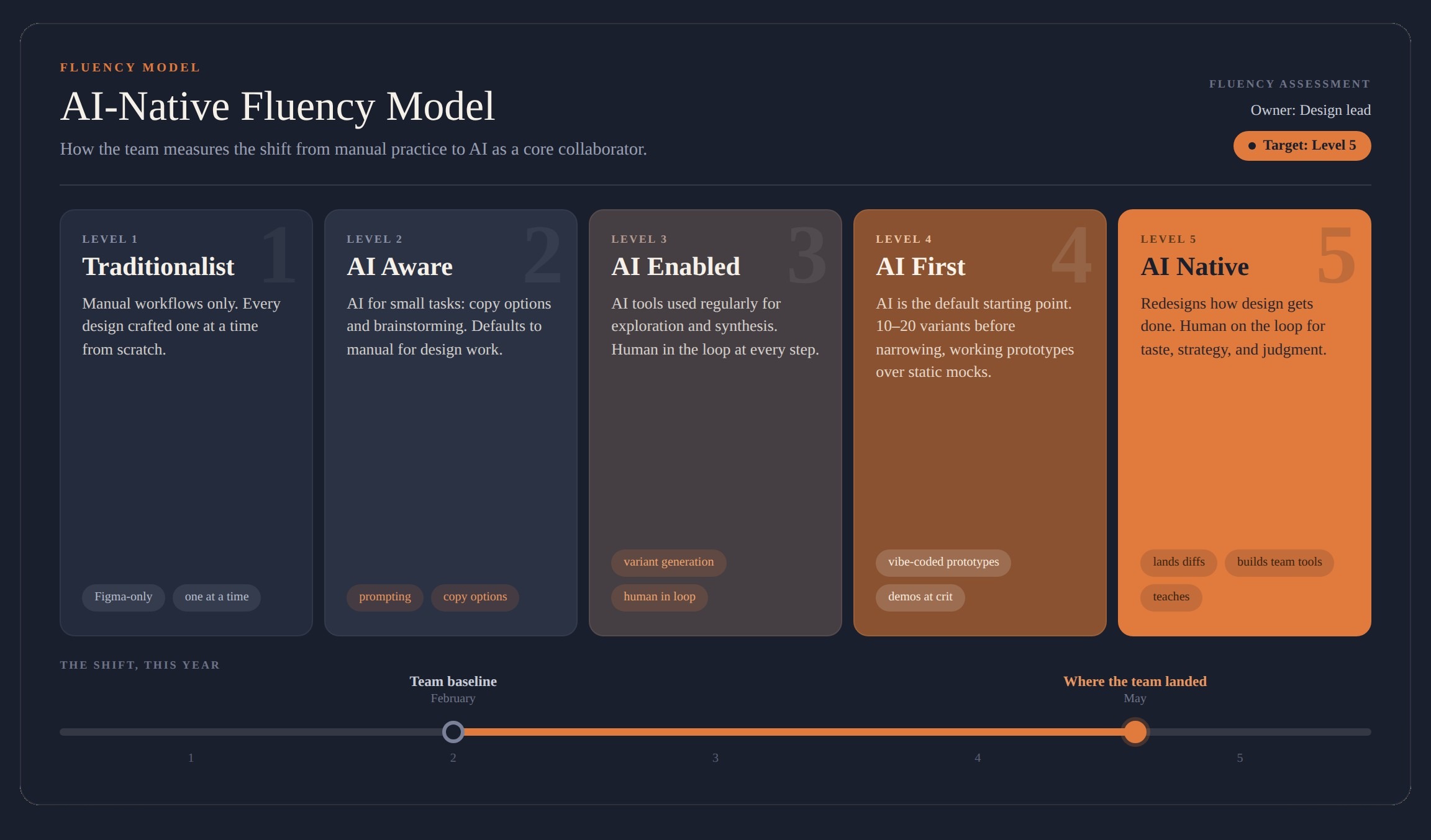
The AI-Native Fluency Model: a five-level maturity spectrum from Traditionalist to AI Native, with the team moving from a February baseline to where it landed in May

The brief

Going AI-native without making more busywork

Design leadership set a clear expectation: every team would work in an AI-native way. My org, Profile, was AI-aware, not AI-native, like most of the company. The mandate was real. The method was missing.

What was actually happening was three disciplines each reaching for AI on their own. Product managers were mocking up screens in Figma. Engineers were designing in Cursor. Designers were trying to ship and land code changes. Everyone was moving, in good faith, but none of it connected, and the roles blurred instead of sharpening. The result was that AI was generating more work than it saved.

ChatGPT
Claude
Figma Make
Cursor
Gemini
Manus
VS Code
Notion
Obsidian
Adobe Firefly
SwSuperwhisper
Midjourney

The tools already in play across the org, before any shared model.

The reframe

Put the right AI at the right point of the cycle

Being AI-native was never going to mean everyone doing everything with AI. It meant a shared operating model that put AI where it actually made the work better, at each part of the product-design cycle, and connected the disciplines instead of blurring them.

I built that model in partnership with my engineering director, so it held across design, engineering, and product rather than living in one function. Instead of a PM mocking up screens in Figma and an engineer designing in Cursor, each stage of the cycle had a clear owner, with design's judgment in the room at every step: synthesis and research with product, exploration and variants with PM, prototyping and shipping with engineering, all with AI.

Before: three silos

  • Productmocking up in Figma
  • Engineeringdesigning in Cursor
  • Designshipping code and diffs

Disconnected. More work, not less.

After: one connected cycle

  • Synthesize & researchDesign and product, with AI
  • Explore & varyDesign and PM, with AI
  • Prototype & shipDesign and engineering, with AI

Connected. Design judgment at every step.

The operating model

Move fast with AI without losing the craft

The model gave every discipline a shared way to work, and it rested on four principles I published for the team.

Build first, align later

When the cost of trying drops from weeks to a day, the bar becomes conviction: show the working thing.

Protect the tinkering

Reserve real time to explore. The fastest path to the goal is often one you haven't found yet, and only tinkering finds it.

Keep the can't-fails moving

Tinkering earns its place by accelerating the work that has to ship.

Taste over volume

AI makes both good and bad taste louder, so product sense and craft matter more now.

With the model in place, the work itself changed. Static Figma files became working prototypes. Decks became live demos. Design and engineering stopped working in sequence and started working together, and designers began shipping real code.

The rollout

Adoption came one person at a time

Adoption couldn’t come by mandate; it came person by person, matched to where each designer actually was. Someone who found dev tools intimidating got a friendlier setup and a peer to pair with for a first code change. Someone already comfortable got pushed to codify their workflow into something the whole team could use. The through-line was hands-on: a “ship your first change” help desk moved the team more than any number of posts.

The hardest part was not technical. AI adoption brought many layers of anxiety: adopting new tools, increasing output, and holding the bar for quality and human creativity. I named it directly and reframed the work: AI amplifies your judgment; the effort is still yours. And I demoed my own setup in one-on-ones, which shifted the framing from a tool people were told to use to one they actually wanted.

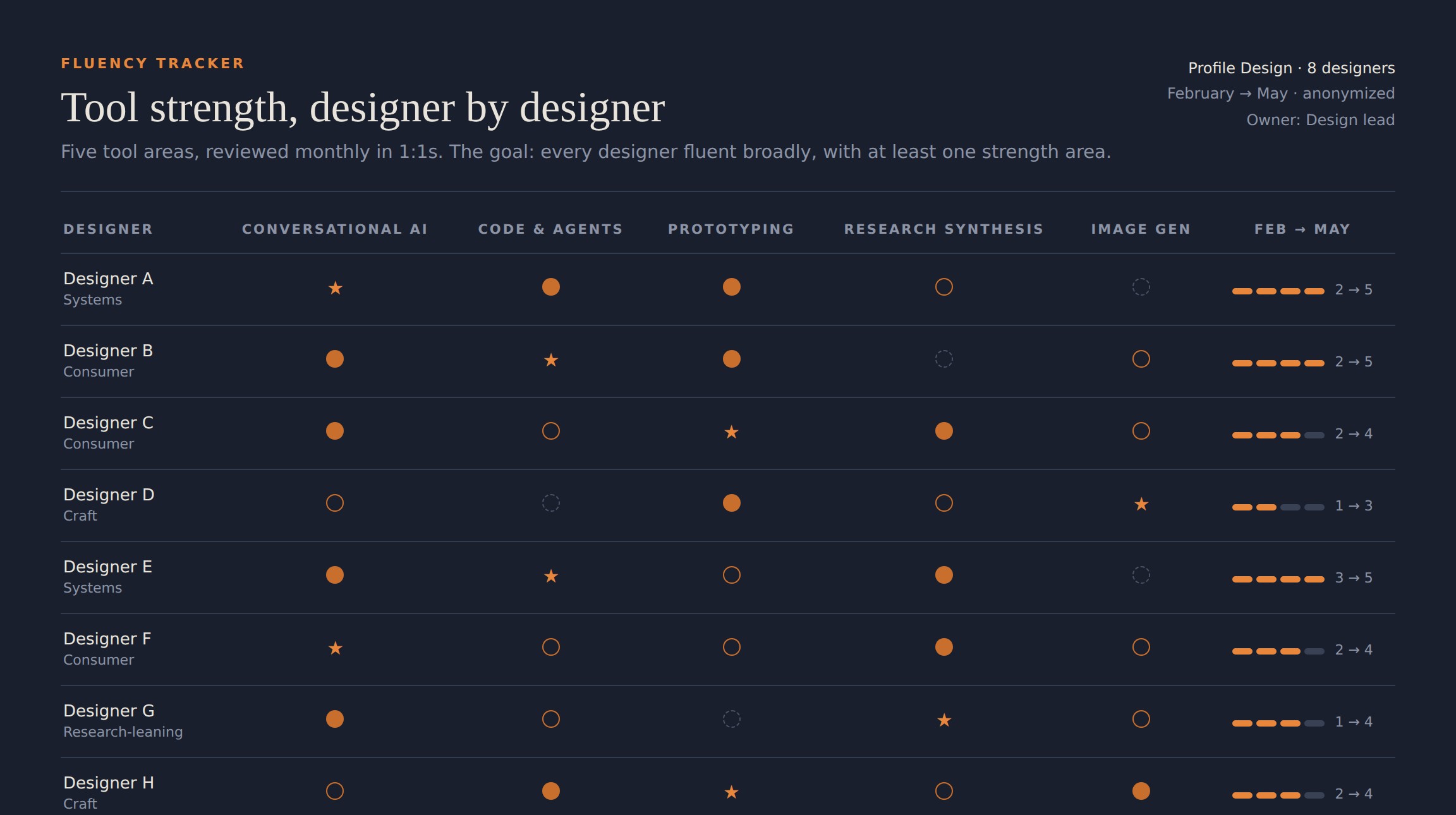
The team fluency tracker: the design team, anonymized, scored across five AI tool areas, February to May, each with at least one strength area
The tracker behind the coaching, anonymized: five tool areas per designer, reviewed monthly, until everyone had a strength area.

The mandate was bigger than Profile, so I was one of a small group asked to lead AI-native adoption for design managers across Facebook. I published playbooks, ran sessions and manager circles, and shared every process, tool, and agent I built with my manager and director peers, so the discipline matured together instead of each org solving the same problem alone.

I built the fluency model once and taught it across the org, so design moved faster than team-by-team adoption could.

The outcome

The model held, and spread

The February training moved one or two designers, then adoption stalled for six weeks. The playbook changed the slope: within six weeks of publishing it, most of the team worked at AI-native fluency and every designer had shipped production code. The team built AI agents that took real quality work, bug-fixing and accessibility remediation, from hours to minutes. And the model traveled: it was adopted beyond Profile, the outcome I cared about most.

SignalFebruaryMay
Designers shipping production code0All
Team at AI-native fluency~25%~75%
AI tools in a designer's daily work1multiple
Reviews run on live demosraredefault
Mocks → Prototypes
Static Figma files became working, testable builds in days, not weeks
Decks → Demos
Leadership reviews ran on interactive prototypes, 2x a week
Days → Hours
Design cycles between feedback rounds took hours, not days

One more thing

AI makes me more hands-on, not less

I split my own assistant into five specialized agents on a shared, always-on workspace. Each owns a lane and runs its own scheduled jobs in the background, so my workspace is already caught up the moment I open it, even mid-meeting. Claud-Scan keeps an eye on my incoming chats, emails, and meeting notes, plus recent leadership posts and published research, and routes it to the specialists. They report up to Claudia, my primary agent, who manages the rest of the team, reconciles their work, and is the one I go back and forth with directly.

Inputschats · email · meetings · leadership posts · research
Claud-Scanintake & triage4× daily
Claud-Briefmeeting prep09:03 · pre-mtg
Claudetteteam & 1:1s12:00 · 19:00
Claudiostrategyalways-running
Claudiathe hub · drafts, reconcilesEOD daily
Me

Claudio is the one I lean on most. It stays on the lookout for what’s top of mind for leadership, interesting signals in research, and unsolved problems, and proposes them to me. I say go, and it runs design loops until it has ready-to-go prototypes.

What it gives me

  • Every meeting prepped for me, with my pre-reads already read and summarized through a leadership lens.
  • An always-on set of eyes on my chats and meetings, flagging what I’d otherwise miss.
  • Proactive coaching for myself: what’s working, and what to watch for with my team.
  • A standing library of polished, ready-to-use concepts, around 100 a month, my team can pull from for almost any people problem or research question.

None of it replaces my judgment or design taste; it clears the busywork so I can put more of myself into the parts that need me: my team, and the thinking.